

Case study · Equipment dealer · Canada
Yuchai Prairie.
Heavy equipment, made easy to evaluate online. We designed and built a bilingual website for the Canadian dealer of Yuchai excavators, from research and UX to a WordPress catalogue the client runs on their own.
Live · yuchaiprairie.ca · EN / FR
Client
Yuchai PrairieDealer of Yuchai equipment
Market
Canada, Prairie regionEnglish and French
Design
Murad AmiarResearch, UX/UI, motion
Development
Dmitry KolesnikWordPress, front end
Year · Status
2026Live site ↗
8
Page templates
2
Languages, EN and FR
5
Lead form types
303
Animated vector paths
The challenge
Complex products. High-consideration decisions.
Construction equipment is not an impulse purchase. Before contacting a dealer, buyers check size, working range, attachments and who will support the machine. Yuchai is a strong manufacturer but a new name in Canada, so the site had to earn trust and make dense technical data easy to use, and the client had to be able to keep it up to date without a developer.
01
Unknown brand, real doubt
Buyers worry about parts, service and resale before they look at price.
02
Information overload
Dozens of parameters per machine. Shown as one table, the numbers that decide a purchase get lost.
03
Two languages
Canada needs English and French, for every page, model and form.
04
A catalogue that grows
New models, photos and spec sheets have to be added by the client in minutes.
One team
Design and development, working as one.
The spec hierarchy from the research became the content model, and the line drawings shipped as code, not as video.
Design
Murad Amiar
Product designer. Turned dealer and manufacturer data into a clear buying path and a technical visual language.
- Competitive audit and market research
- Personas, jobs to be done, journey map
- Information architecture and user flows
- UI design and component system
- Line-draw motion for three key moments
Development
Dmitry Kolesnik
Full-stack developer. Built the design as a custom WordPress theme the client can run on their own.
- Custom theme and page templates
- Equipment catalogue with editable specs
- English and French versions
- Quote, parts and service forms
- Responsive build and SVG animation
01 — Design
Design

Murad AmiarResearch, UX/UI, information architecture, motion
Research
How the leaders sell a machine.
We reviewed manufacturer sites, regional dealers and equipment marketplaces. A pattern repeats: a few decision-critical numbers and an application story first, engineering data deeper in the journey.
| Observation | UX implication | Our response |
|---|---|---|
| Decisions start with fit, not with full specs | Surface a few critical numbers first | Key-spec bar on every model page |
| Tight access drives mini-excavator choice | Translate dimensions into jobsite meaning | "Compact where access matters" |
| Professional buyers still need depth | Use progressive disclosure | Performance, dimensions, lifting chart |
| Attachments multiply what a machine can do | Make attachments part of discovery | Dedicated attachment story |
| Confidence depends on support after purchase | The promise can't stop at the machine | Parts, service and local support on the homepage |
Core insight
Don't make buyers read a spec sheet before they understand the machine.
Every page answers questions in the order a buyer asks them. Technical depth grows as purchase intent grows.
- Q1
What is this machine?
Hero · model and class
- Q2
Will it fit?
Four key specs · min. width
- Q3
What can it do?
Access · digging · versatility
- Q4
What tools can it run?
AUX1 flow · attachments
- Q5
Full specs?
Imperial / metric · lifting chart
- Q6
How do I get a quote?
Short form with intent chips
Visual system
Engineering drawing meets the Prairie.
Graphite and warm off-white carry the page. The accent is Yuchai yellow, the colour of the machines, used only for actions and technical lines. Manrope for display, Inter for reading.
Graphite#151B1F
Charcoal#252D32
Off-white#F5F4EF
Light gray#E7E8E5
Yuchai yellow#FEBC38
Prairie gold#A88B4A
Display · Manrope ExtraBold
Aa
Uppercase headlines with tight tracking, second line in a muted tone that passes WCAG AA for large text.
Body · Inter
Aa
Body copy, spec rows with tabular numbers, and small uppercase technical labels.
Motion
The machine is engineered on the page.
Three technical drawings build themselves stroke by stroke, in the order the part is assembled. Duration follows path length, strokes overlap like a single hand, and closed shapes finish without a seam.
Hero excavator
111 paths in eight build groups, from tracks to boom.
Boom lamp assembly
89 paths. Supports “Why Yuchai Prairie”: every part is documented.
Bucket, exploded view
103 paths. Opens the attachments story: one machine, many jobs.
Key screens
Building trust before asking for a quote.
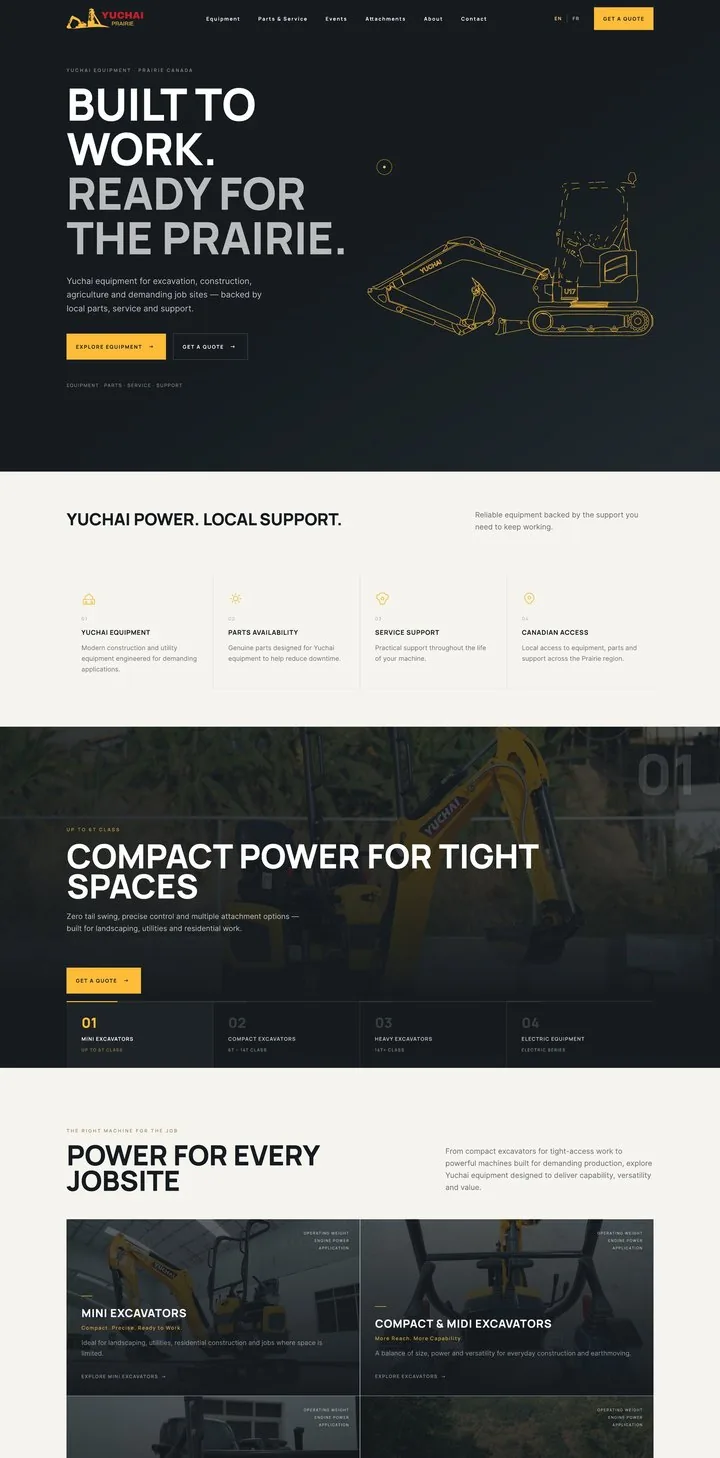
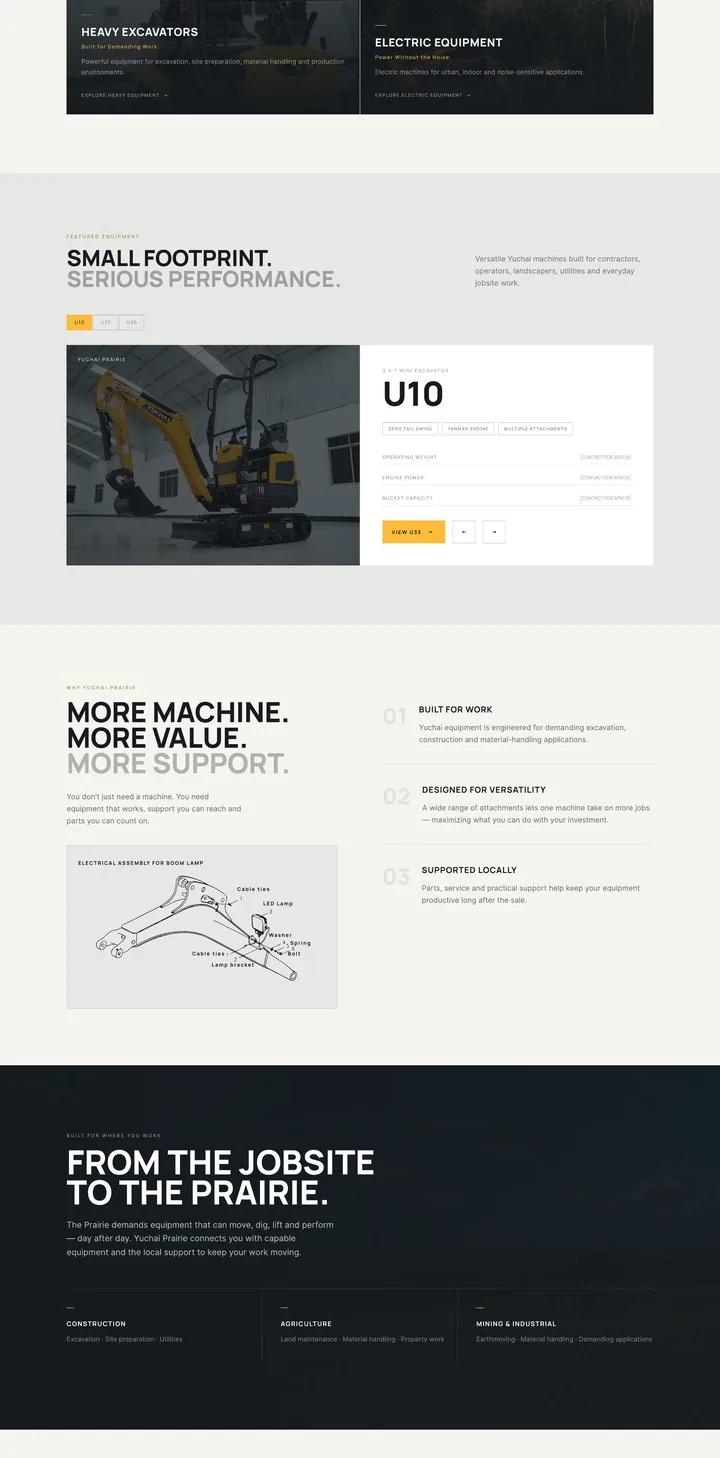
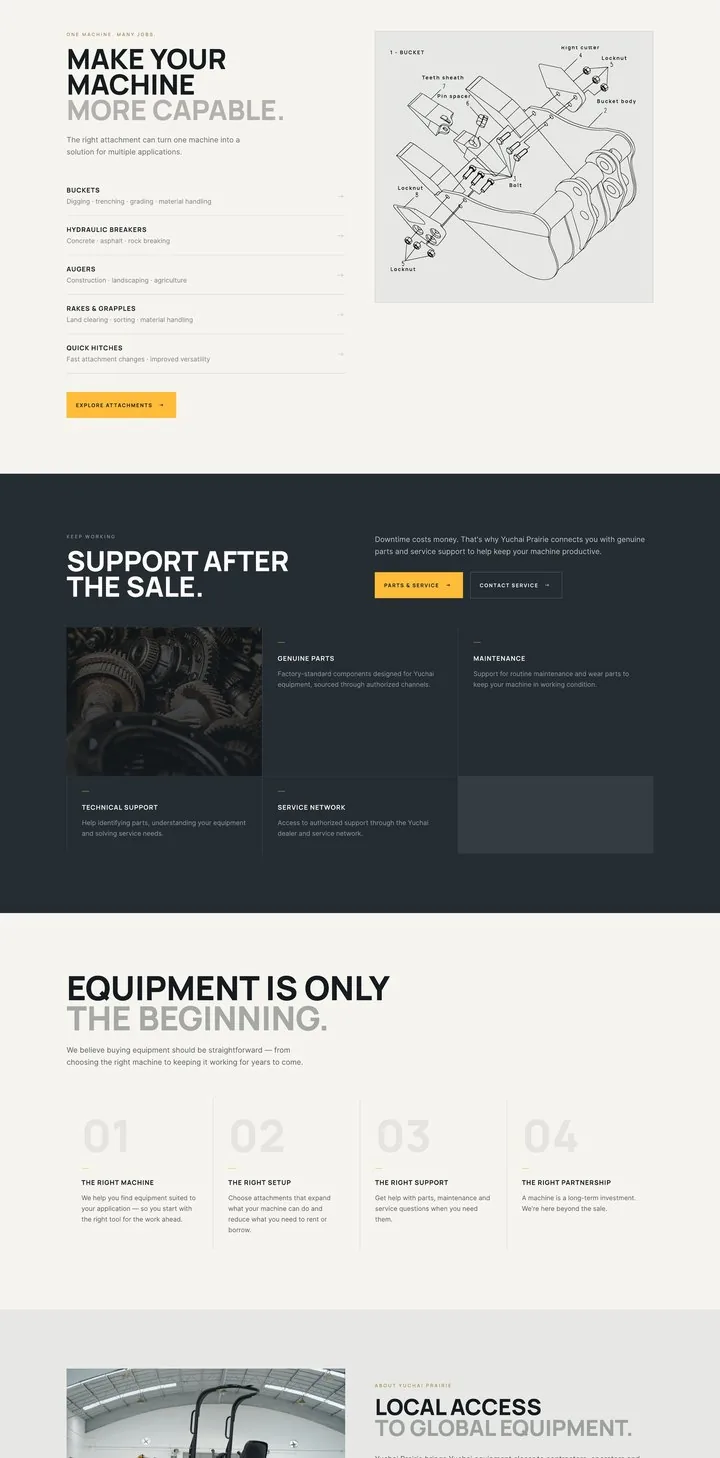
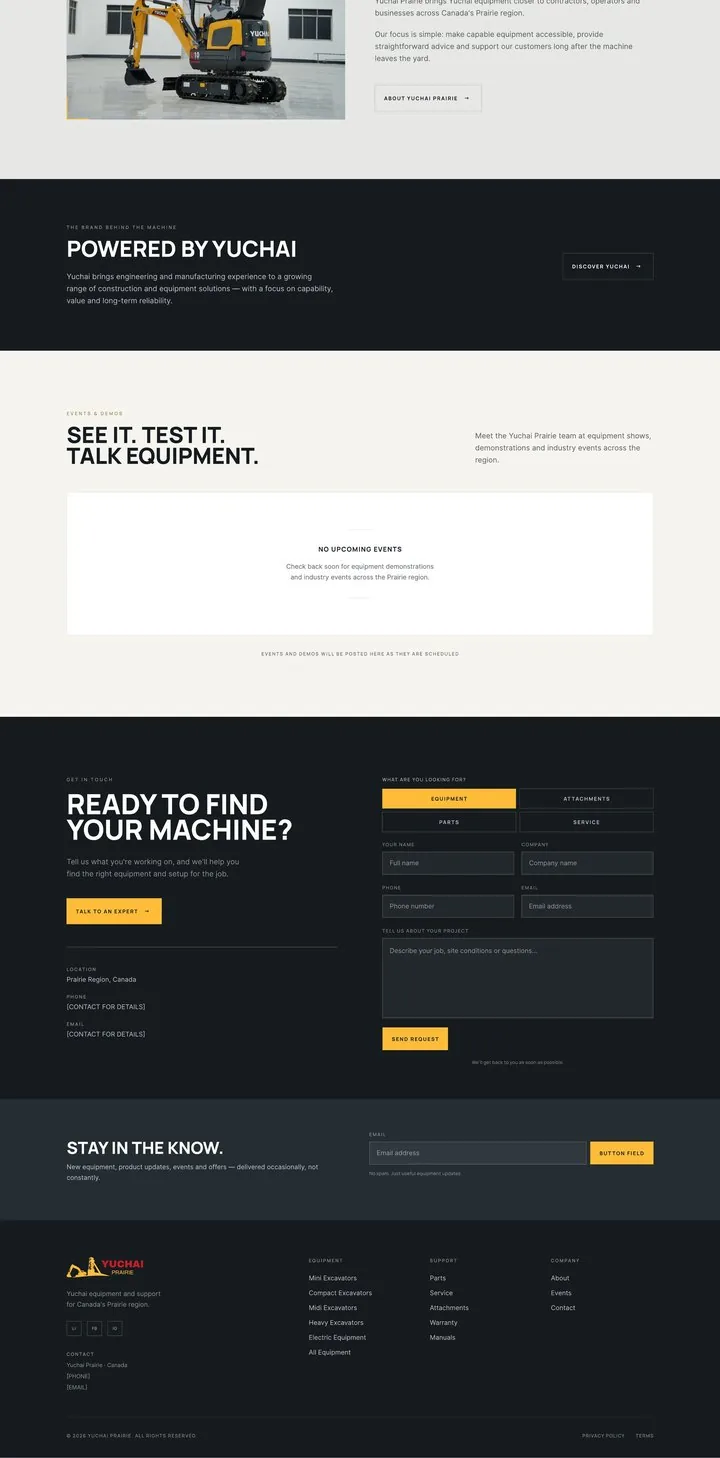
The homepage answers three questions: what does the dealer sell, why trust them, and what to do next. Model pages answer the rest.
Homepage
Sixteen sections, one story
Classes by weight, featured models, reasons to choose, attachments, support after the sale and a short quote form.
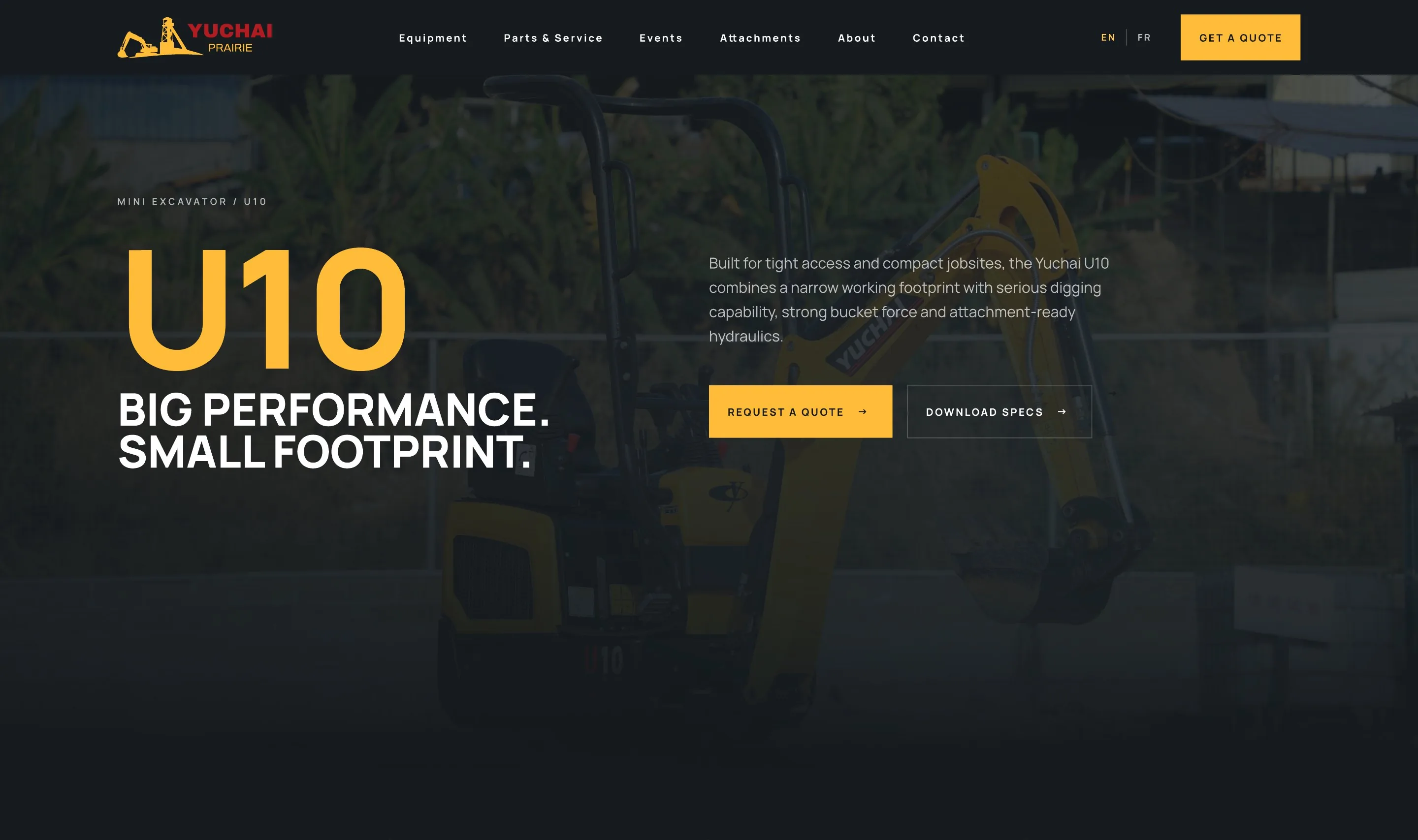

Specs first
Weight, dig depth, bucket force and minimum width sit above the fold. Pounds and kilograms together.
Access, digging, versatility
Three columns match the three buyer checks: does it fit, can it dig, what can it run.
Imperial and metric
One toggle converts the whole spec table. Unconfirmed values are flagged, not hidden.
One clear next step
“Is the U10 right for your job?” leads to the quote form, related models keep buyers in the catalogue.
02 — Development
Development

Dmitry KolesnikWordPress theme, catalogue, languages, forms, front end
Stack
A custom WordPress theme, built to be run by the client.
A child theme on GeneratePress with templates for the homepage, catalogue, model pages, attachments, parts and service, contacts, journal and events. Shared parts of the interface live in reusable templates.
Platform
WordPress · PHP
Theme, templates, catalogue structure and site logic
Base theme
GeneratePress / GP Premium
Lightweight parent theme
Content
ACF Pro
Specs, galleries, PDFs and editable page blocks
Languages
Polylang Pro
Linked EN / FR pages, models and menus
Forms
Contact Form 7
Quotes, parts, service, contact, newsletter
Events
The Events Calendar
Shows and demos
Front end
HTML · CSS · JS · SVG
Responsive layout, interactions, animation
Workflow
Docker · MariaDB · WP-CLI · Git
Local environment, automation, version control
Content model
One machine, entered once.
Equipment is its own content type with categories. A model is filled in once in the admin and appears everywhere it is needed, without copying data.
In the admin
Equipment
Custom post type + category taxonomy- Specifications
- Photo gallery
- PDF spec sheet
- Related models
Page blocks
ACF fields- Homepage sections, texts, images
- Contact details
EN ⇄ FR
Polylang, linked translationsOn the site
Catalogue
Category switcher, model cards with key specs
Model page
Specs, swipe gallery, PDF download, related models
Homepage
Category slider and featured models
Quote request
The chosen machine or attachment is passed into the form
Built in
What the build takes care of.
Design decisions from the research became working features, each one testable on the live site.
Catalogue
Specs without code
Models, categories, characteristics, galleries and PDF specs are managed in the admin.
Bilingual
English and French
Linked translations, language menus and localized forms for the Canadian market.
Leads
Forms that carry context
Quote, parts, service, contact and newsletter. A chosen attachment is filled into the request automatically.
Interaction
Galleries, switchers, modals
Swipe galleries, category and model switchers, mobile navigation and modal forms, usable from the keyboard.
Motion
Line drawings in code
The SVG animations run on the site itself and respect the reduced-motion setting.
Responsive
Desktop, tablet, phone
Menus, cards, galleries and forms are worked out for every screen size.
Workflow
From local setup to a client who runs the site alone.
01 —
Set up
Local environment with Docker and MariaDB, version control in Git.
02 —
Build
Child theme, templates and the equipment content model, straight from the design.
03 —
Fill
WP-CLI scripts seed the site and import photos and spec documents.
04 —
Hand over
A content guide so the client team updates models, texts and documents on their own.
Design intent intact, from the first wireframe to the live site.
Outcome
A product-led equipment experience, live.
One bilingual site that brings together the brand, the equipment catalogue and customer requests, with a structure that lets the client add new models and keep growing it through WordPress.
Technical complexity shouldn't be removed. It should be sequenced, and then built so the client can keep it that way.